[Circuit 2.1] Beep boop
In this exercise we’ll start mapping an analog input to our first actuator, a piezzo buzzer!
It’s a speaker in its simplest form, just a membrane that vibrates when it receives an electic current.
This will make a lot of annoying sounds. Sorry about it! But it’s also fun :D
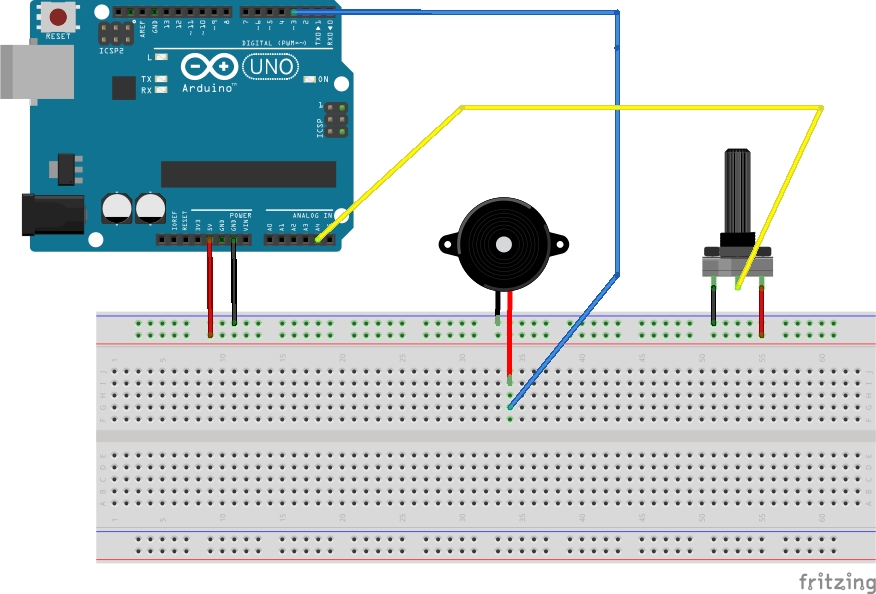
const int poti = A4;
const int buzzer = 3; // this has to be a PWM pin!

int reading, mapping;

void setup() {
    Serial.begin(9600);
    pinMode(poti, INPUT);
    pinMode(buzzer, OUTPUT);
}

void loop() {
  reading = analogRead(poti);
  Serial.println(reading);
  mapping = map(reading, 0, 1023, 200, 800);
  tone(buzzer, mapping);
}
tone is a special function in Arduino that takes a pin and a frequency. It will then modulate the states on that pin to mimic the given frequency. Attached to a membrane this will create sound! Magic!
If you’re wondering how exactly the Arduino produces the sound (it’s all PWM after all!) you can find a very in-depth description with code examples here.
You may know map from coding environments like Processing, it’s also called map_range sometimes.
In this case it has nothing to do with the ‘functional-style’ map that you may know from map, filter, reduce.
Our map interpolates the first argument, originating from a range defined by arguments two and three, into a new range defined by arguments four and 5.
We just map the analog values from out poti to a range of frequencies, which arguably doesn’t sound pleasant.
As an exercise, look up frequencies from actual notes and think of a different kind of mapping.
You could for example map to a range from 0 - 8 (scale size) and then look up the appropriate notes from an array using the mapping as index.